Else

✓ Verified by AITL
November 19, 2026

Pay-per-Task AI Agent with Itemized Receipts

Else is a pay-per-task AI agent. You hand it a job such as a slide deck, a trip plan, a website or a sales report, and every run ends with an itemized receipt. No subscription: free starting balance, then top-ups from $5 that never expire.

Category:
AI Automation
Pricing Model:
Freemium
Last checked:
November 19, 2026
Reviewed by:
Marian Cojocaru
Pricing Snapshot
Billing Frequency:
Usage-based (prepaid balance)
Paid Option From:
$5 top-up (pay per task, no subscription)
Last Known Major Update:
September 2026

Some links on AITL are affiliate links and we may earn a commission at no extra cost to you. It never affects our reviews. How we curate

At a glance
Else
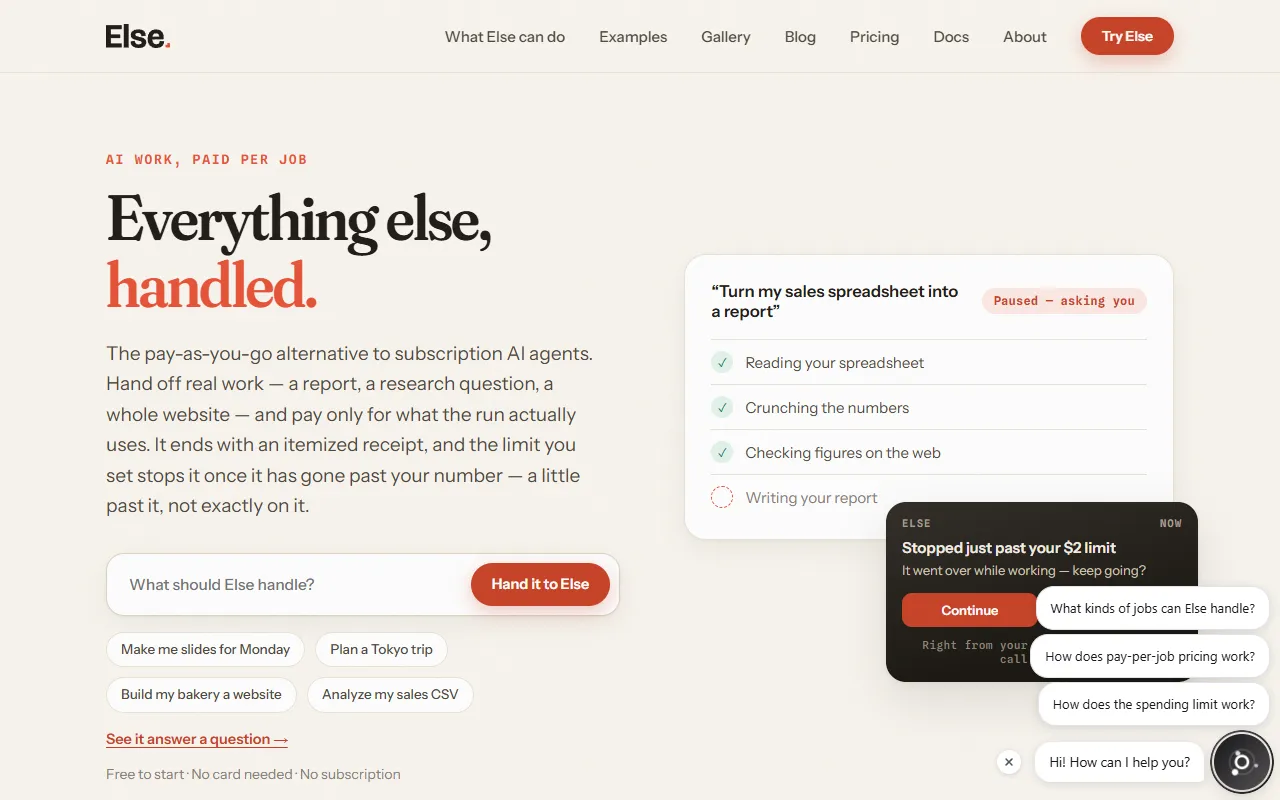
Homepage screenshot
Pros:
  • Pay per task with no subscription, seats or credits
  • Itemized receipt for every task, to a fraction of a cent, with replay
  • 81 models across four tiers, switchable mid-task
  • Scheduled tasks that run daily or weekly
  • Connects to Gmail, Google Drive, Slack, Notion and Google Calendar and asks before sending
  • Free starting balance with no card, and top-ups never expire
Cons:
  • Task prices vary with the tier and the work, so the cost is not known up front
  • Spending limits are checked after each step, so a run can go slightly past the limit
  • The size of the free starting balance is not stated
  • Purchases are non-refundable except for failed-task adjustments or where the law requires

No public API available

Last known major update

September 2026

Auto routing stopped sending ordinary jobs to the most expensive engine, and receipts now show the run date.

Official announcement

About the tool

Else is an AI agent for people who want work done without a monthly plan. You describe a task in one sentence, for example "turn this CSV into a monthly sales report" or "plan a 5-day Tokyo trip for two kids on a mid budget", and Else does it: it reads your files, browses the web, runs code in a secure workspace and returns finished output such as slides, spreadsheets, reports, websites or research with sources. Tasks keep running after you close the app, and your phone gets a notification when the result is ready. Each task runs on one of four tiers: Auto, Fast, Smart or Max. Auto picks the tier for each job, and you can switch tier or model mid-task, choosing from 81 models including OpenAI, Gemini, Claude, Llama, Qwen, Kimi, GLM and MiniMax. You can set standing jobs that run on a schedule, like an inbox digest every morning, a weekly numbers summary or a price watch. Connected apps such as Gmail, Google Drive, Slack, Notion and Google Calendar let Else read your data and draft actions, and it asks before sending anything. Every task has a spending limit, $5 by default, and when a run goes past it Else stops and asks whether to continue. Pricing is pay as you go. New accounts get a free starting balance with no card, and after that you top up $5, $20 or $100; the balance never expires. A task is billed for the model tokens it uses, from $1.80 per 1M input tokens on the Fast tier to $6.00 on Max, plus $0.002 per web page read and $0.0048 per minute of code run time. Every task ends with a receipt that lists each charge to a fraction of a cent, and you can replay the run.

Key use cases

Task Automation

Trigger actions from events automatically, with less manual coordination in project work and service delivery.

Workflow Automation

Link your apps and automate repeated actions, so repetitive tasks stop taking up your time.

Data Analysis

AI data analytics that turns raw data into insights through summaries, pattern detection and anomaly spotting.

AI Knowledge Assistants

Ask questions in an AI chat, similar to ChatGPT, and get answers drawn from your documents, meetings and systems.


Pricing and plans

  • Free starting balance: $0. Every new account starts with a free balance for real tasks, no card required.
  • Starter top-up: $5. Balance never expires, every feature included, receipt for every task.
  • Everyday top-up: $20. Balance never expires, every feature included, receipt for every task.
  • Power top-up: $100. Balance never expires, every feature included, receipt for every task.
  • Task costs by tier (per 1M tokens). Fast (gemini-3.6-flash): $1.80 input, $9.00 output. Smart (gpt-5.6-terra): $2.40 input and $14.40 output up to 272K tokens, $4.80 and $21.60 above. Max (claude-opus-5): $6.00 input, $30.00 output. Auto picks a tier for each job.
  • Other metered items. Reading a web page: $0.002 per page. Running code: $0.0048 per minute of run time. Audio transcription and app actions are itemized on the receipt.

Prices are in USD and may exclude taxes. There is no subscription, no seats and no credits: top-ups are amounts added to your balance, not task prices. Handed-off tasks start with a $5 spending limit that you can change; the check runs after each step, so a task can end slightly past the limit. If the balance runs out mid-task, the task pauses and keeps the finished steps. Purchases are non-refundable except where required by law or where a failed-task adjustment is shown.

November 19, 2026
See alternatives

Frequently asked questions

Is Else free?

To start. Every new account gets a free starting balance for real tasks, with no card needed, but the site does not state the amount. After that you top up $5, $20 or $100, with no subscription, seats or credits, and every task ends with an itemized receipt. Checked November 19, 2026 (pricing).

How much does a task on Else cost?

It depends on the tier and the work. Per 1M tokens, Fast costs $1.80 input and $9.00 output, Smart $2.40 and $14.40 up to 272K tokens, and Max $6.00 and $30.00. Reading a web page costs $0.002, and running code costs $0.0048 a minute. Each task has a $5 spending limit by default. Checked November 19, 2026 (pricing).

Does my Else balance expire, and can I get a refund?

The balance does not expire on an active account. Purchases are non-refundable except where the law requires it or where a refund, failed-task adjustment or promotional policy is shown to you. A spending limit is checked after each step, so a task can end slightly past it (Terms, updated July 17, 2026).

Is my data used to train AI?

No, unless you opt in. The privacy policy says tasks, prompts, files and outputs are not used to train or improve AI systems unless you turn on "Help improve the product using my tasks" in Settings, which is off by default. Conversations, tasks and uploads are kept until you delete them or your account, subject to backup rotation (Privacy Policy, updated July 17, 2026).

Who owns the work Else produces?

You do. The Terms say you keep ownership of what you provide and, as between you and Else, you own the text, images, code and files generated for you. Else assigns to you any rights it has in that output. The Terms give you no rights in third-party content the output may resemble (Terms, updated July 17, 2026).

Who makes Else?

Wrise, LLC, at 131 Continental Dr, Suite 305, Newark, Delaware 19713, USA. The Terms follow Delaware law, with disputes in the state and federal courts in Delaware, and users must be at least 18 (Terms).

Automation integrations

Native connectors with Zapier, Make and Albato, checked by AITL.

No direct integrations listed

No public direct integrations currently listed with Zapier, Make, or Albato.

Official channels

Where this tool is active and shares its updates.

Similar tools

Submit your product!

Submit your AI tool for review. The AITL team evaluates every submission by hand. Add the AITL badge to your site and send us the link to get a reply within 48 hours.

Submit now

Side by side

Facts from each tool's AITL page. AITL does not pick a winner.

Open on the Compare page

Listed on AITL? Get your badge

Show visitors that your tool is listed on AITL. Copy the code below and paste it into your website's HTML. The badge links straight to this page.

Listed on AITL badge preview
  1. 1Copy the badge code
  2. 2Paste it into your site, for example the footer
  3. 3Visitors click through to your AITL listing
Free weekly email

One AI workflow a week

Every week we combine 2–4 tools from AITL into a step-by-step workflow you can try in minutes.

  • Clear steps, from the first tool to the result
  • Only tools we reviewed and listed on AITL
  • Plus the newest tools we listed that week

No spam. Unsubscribe anytime. See our Privacy Policy

You're in. Watch your inbox for your first workflow.
Oops! Something went wrong while submitting the form.
Example issue
4 tools · about 20 min

Turn one meeting into a week of social posts

Fathom
Claude
Leonardo AI
SocialBee
  1. Fathom records the call and writes the summary.
  2. Claude turns it into 5 short posts.
  3. Leonardo AI makes one image per post.
  4. SocialBee schedules them across the week.

Else

$5 top-up (pay per task, no subscription)

Visit Website