
BlendCanvas

✓ Verified by AITL
November 23, 2026

Infinite Canvas for AI Images, Video and Music

BlendCanvas is a browser workspace for making AI images, video and music on one infinite canvas of connected nodes. Eligible new accounts get 10 credits, and plans start at $12/month for 1,000 credits.

Category:
AI Image
Pricing Model:
Freemium
Last checked:
November 23, 2026
Reviewed by:
Marian Cojocaru
Pricing Snapshot
Billing Frequency:
Monthly / One-time
Paid Option From:
$12/month (Starter, 1,000 credits); credit packs from $5
Last Known Major Update:
Not publicly available

Some links on AITL are affiliate links and we may earn a commission at no extra cost to you. It never affects our reviews. How we curate

Private. Your feedback isn't shown on this page. See our Privacy Policy.

Feedback sent. Thank you.
Your feedback wasn't sent. Check your connection and try again.
At a glance
BlendCanvas
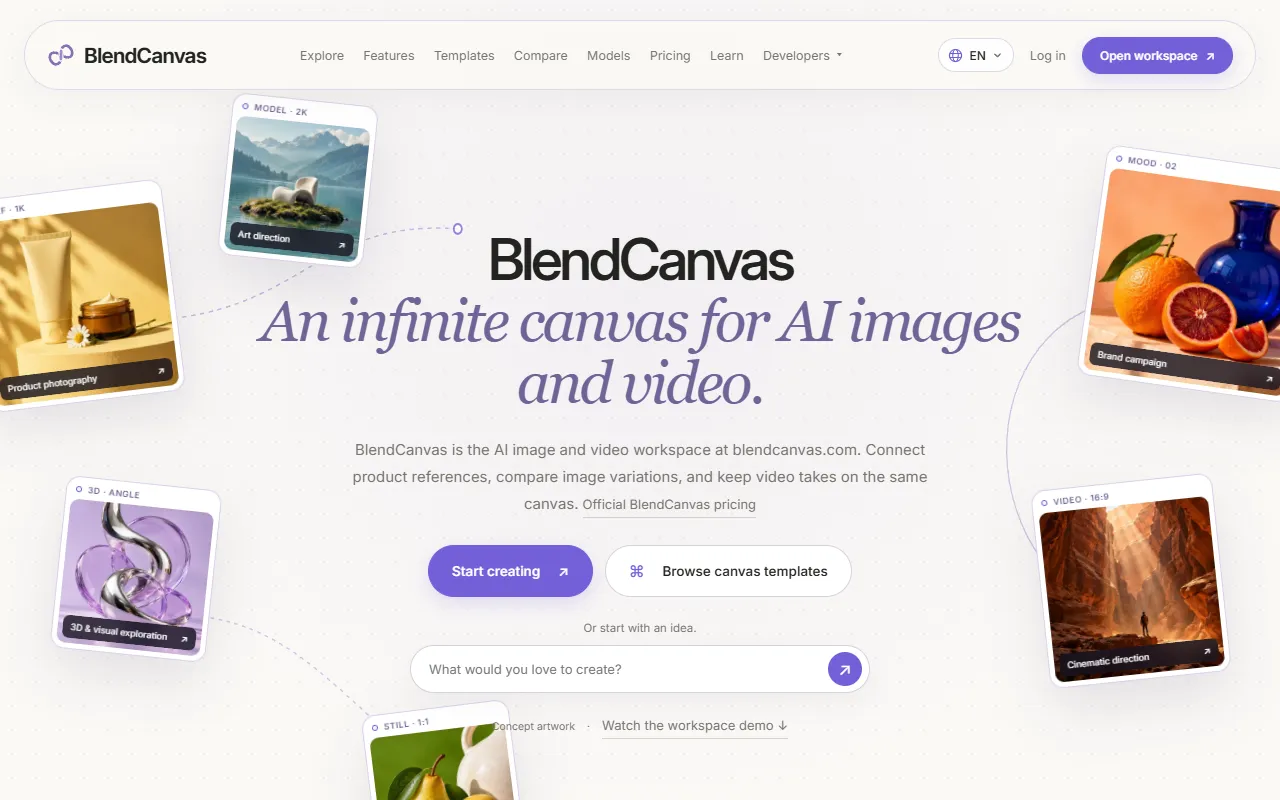
Homepage screenshot
Pros:
  • Images, video, music and text share one canvas and one credit balance
  • One brief can branch into several image models for side-by-side comparison
  • Mask inpainting, upscaling, splitting and 3D camera angle control on the canvas
  • Credits from plans, packs and the welcome grant stay in the account until used
  • Credits for failed generations are returned automatically
  • One-time credit packs from $5, without a subscription
  • Credit rates for every model are published
  • Remote MCP server for Claude Code, Codex, Cursor and other clients
Cons:
  • 10 welcome credits do not cover a video clip
  • Video uses credits quickly: a 5-second Wan 3.0 clip at 720p costs 120 credits
  • No public generation API
  • Listed MCP tools cover canvases and text notes, with no media generation
  • Commercial-use permission for outputs is not guaranteed
  • Refunds only within 7 days of the first purchase, if none of it was used
  • Assistant skill descriptions are published in Chinese

No public API available

About the tool

BlendCanvas is an infinite canvas that runs in the browser. Reference photos, text briefs, images, video clips and audio sit on the board as nodes, and each generated version stays connected to the prompt and references that produced it. One brief can branch into several image models so the results can be compared side by side. Image tools include mask inpainting, upscaling, cropping, splitting multi-panel sheets, and camera angle control on a 3D stage. The model catalog has 25 image, 6 video, 4 text and 5 audio models, such as GPT Image 2, Nano Banana, Veo 3.1, Seedance 2.0, Wan 3.0, MiniMax H3 and Suno v6. Users do not need their own API keys or a GPU. A canvas assistant can turn a short brief into a storyboard, character sheet or moodboard layout. Templates cover product photography, style comparison, character turnarounds, video storyboards and material studies. Canvases are stored in the cloud, and a remote MCP server connects them to clients such as Claude Code, Codex and Cursor. Eligible new verified accounts get 10 welcome credits once. Monthly plans cost $12 for 1,000 credits, $24 for 2,100 and $49 for 4,500, and one-time packs start at $5 for 500 credits. A GPT Image 2 image at 1K uses 1 credit, a Veo 3.1 request uses 23, and Wan 3.0 video at 720p uses 24 credits a second. Unused credits stay in the account, and credits for failed generations are returned. Users must sign in and be at least 18. Quguo Limited in Hong Kong operates BlendCanvas, which is derived from the open-source tigerowo/infinite-canvas project under the GNU AGPL v3.0 license.

Key use cases

Creative Visualization

See designs, concepts and new looks before you commit, using an AI image generator for realistic previews. Many start free.

Graphic Design

An AI image creator for logos, illustrations and marketing visuals. Generate, edit and refine from simple prompts.

Video Production

Script, edit and produce polished videos faster, with automated captions, visual effects and an AI voice generator for voiceovers.

Pricing and plans

  • Free trial: $0. 10 welcome credits once for eligible new verified accounts, enough for up to 10 GPT Image 2 images at 1K.
  • Starter: $12/month. 1,000 credits a month, up to 1,000 GPT Image 2 images at 1K or 8 five-second Wan 3.0 clips at 720p.
  • Creator: $24/month. 2,100 credits a month, up to 2,100 GPT Image 2 images at 1K or 17 five-second Wan 3.0 clips at 720p.
  • Studio: $49/month. 4,500 credits a month, up to 4,500 GPT Image 2 images at 1K or 37 five-second Wan 3.0 clips at 720p.
  • Credit packs (one-time): $5 for 500 credits, $10 for 1,000, $25 for 2,500. No subscription needed.

Example rates: GPT Image 2 costs 1 credit at 1K and 7 at 2K or 4K, Nano Banana 3, Veo 3.1 23 per request, Wan 3.0 12 to 47 a second, Seedance 2.0 26 a second, MiniMax H3 13 to 21 a second, and Suno v6 13 per request. Plans renew monthly until canceled, with no yearly plans listed. Credits stay in the account until used, and credits reserved for failed generations are returned. Refunds can be requested within seven calendar days of the first purchase if none of it has been used. Prices are in USD.

November 23, 2026
See alternatives

Frequently asked questions

Is BlendCanvas free?

Partly. Eligible new verified accounts get 10 welcome credits once, enough for up to 10 GPT Image 2 images at 1K. They do not cover a video, since the lowest video rate is 12 credits a second. After that, BlendCanvas needs a monthly plan or a credit pack. Checked November 23, 2026 (pricing).

How much does BlendCanvas cost?

Monthly plans cost $12 for 1,000 credits (Starter), $24 for 2,100 (Creator) and $49 for 4,500 (Studio). One-time packs cost $5 for 500 credits, $10 for 1,000 and $25 for 2,500. A GPT Image 2 image at 1K uses 1 credit and Wan 3.0 video at 720p uses 24 a second. Checked November 23, 2026 (pricing).

Do BlendCanvas credits expire, and can I get a refund?

Credits stay in the account until used, and credits reserved for a failed generation are returned (pricing). A refund can be requested within seven calendar days of the first purchase if none of it has been used. BlendCanvas also reviews duplicate or unauthorized charges (Refund Policy).

Is my content used to train AI?

BlendCanvas sends prompts and references to the model you select, and says each provider's retention and training practices follow its own terms. Its policy does not say whether BlendCanvas trains models itself. Hosted data is kept as long as needed for the service, security, disputes and legal duties (Privacy Policy).

Can I use BlendCanvas images and videos commercially?

BlendCanvas does not guarantee it. You keep the rights you hold in your inputs, and rights to outputs depend on the law and the model provider's terms (Terms of Service). Its disclaimer says that no commercial-use permission or copyright clearance is guaranteed (Disclaimer).

Does BlendCanvas have an API?

Generation API keys are not available to the public. A read-only catalog endpoint lists models, plans and credit rates without a key (API page). A remote MCP server lets clients such as Claude Code and Cursor list, read and create canvases and add text notes with a personal token (MCP page).

Who makes BlendCanvas?

Quguo Limited, registered in Kowloon, Hong Kong, operates BlendCanvas. The company says the product is derived from the open-source project tigerowo/infinite-canvas under the GNU AGPL v3.0 license, and that it has no affiliation with background-removal apps named Blend (About).

Automation integrations

Native connectors with Zapier, Make and Albato, checked by AITL.

No direct integrations listed

No public direct integrations currently listed with Zapier, Make, or Albato.

Official channels

Where this tool is active and shares its updates.

Similar tools

Submit your product!

Submit your AI tool for review. The AITL team evaluates every submission by hand. Add the AITL badge to your site and send us the link to get a reply within 48 hours.

Submit now

Side by side

Facts from each tool's AITL page. AITL does not pick a winner.

Open on the Compare page

Listed on AITL? Get your badge

Show visitors that your tool is listed on AITL. Copy the code below and paste it into your website's HTML. The badge links straight to this page.

Listed on AITL badge preview
  1. 1Copy the badge code
  2. 2Paste it into your site, for example the footer
  3. 3Visitors click through to your AITL listing
Free weekly email

One AI workflow a week

Every week we combine 2–4 tools from AITL into a step-by-step workflow you can try in minutes.

  • Clear steps, from the first tool to the result
  • Only tools we reviewed and listed on AITL
  • Plus the newest tools we listed that week

No spam. Unsubscribe anytime. See our Privacy Policy

You're in. Watch your inbox for your first workflow.
Oops! Something went wrong while submitting the form.
Example issue
4 tools · about 20 min

Turn one meeting into a week of social posts

Fathom
Claude
Leonardo AI
SocialBee
  1. Fathom records the call and writes the summary.
  2. Claude turns it into 5 short posts.
  3. Leonardo AI makes one image per post.
  4. SocialBee schedules them across the week.

BlendCanvas

$12/month (Starter, 1,000 credits); credit packs from $5

Visit Website