
Inbox Zero

✓ Verified by AITL
November 23, 2026

Open Source AI Email Assistant for Gmail and Outlook

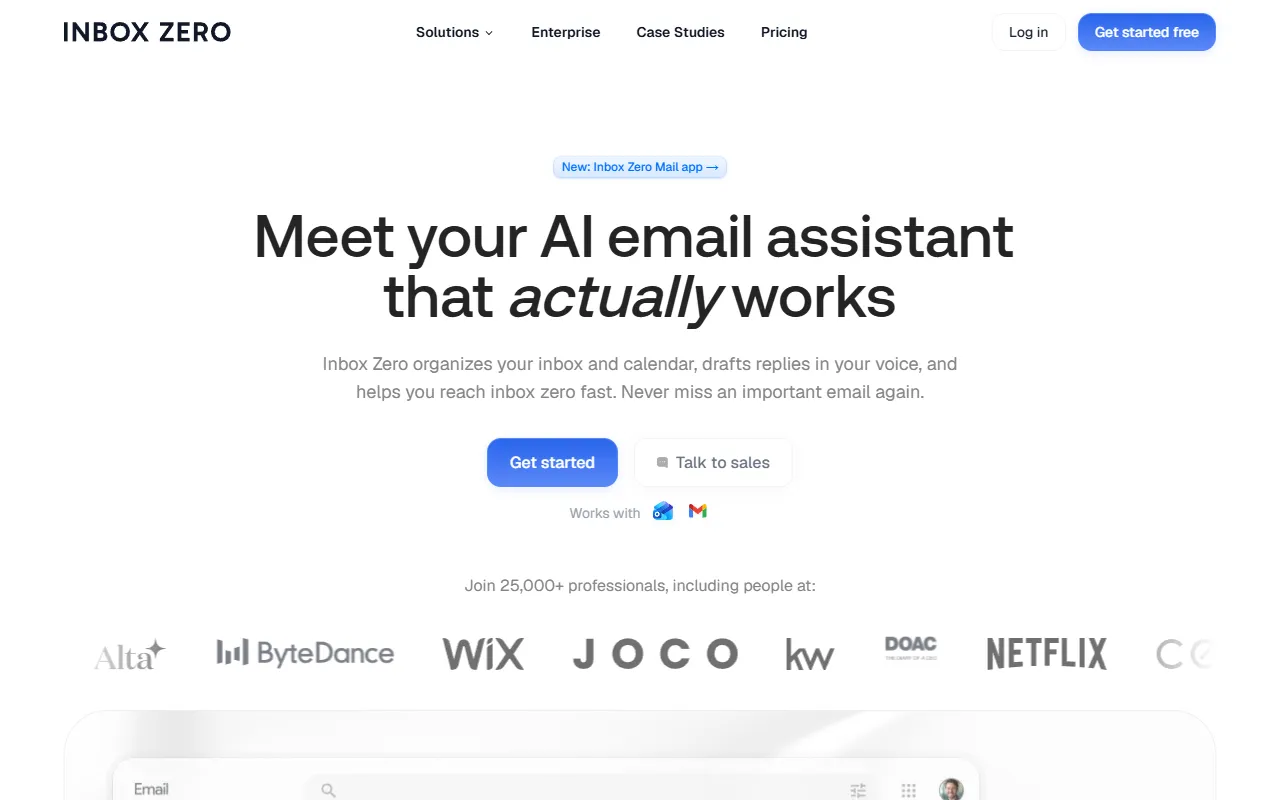
Inbox Zero is an open source AI email assistant and email app for Gmail and Outlook that labels incoming mail, drafts replies in your voice, blocks cold email and unsubscribes in bulk. From $20 per user a month, billed yearly.

Pricing Model:
Free Trial
Last checked:
November 23, 2026
Reviewed by:
Marian Cojocaru
Pricing Snapshot
Billing Frequency:
Monthly / Yearly
Paid Option From:
$25/user/month, or $20/user/month billed yearly
Last Known Major Update:
August 16, 2026

Some links on AITL are affiliate links and we may earn a commission at no extra cost to you. It never affects our reviews. How we curate

Private. Your feedback isn't shown on this page. See our Privacy Policy.

Feedback sent. Thank you.
Your feedback wasn't sent. Check your connection and try again.
At a glance
Inbox Zero
Homepage screenshot
Pros:
  • Labels mail and drafts replies inside Gmail and Outlook
  • Rules written in plain English
  • Own email app for web, Mac, Windows and iPhone
  • Two email accounts included on every plan
  • Open source, with self-hosting on your own server
  • API, command-line tool and MCP server for AI clients
  • 14-day refund after upgrading
Cons:
  • No free plan on the hosted service
  • Trial requires a credit card
  • Notetaker, digests and app integrations need the Plus plan
  • Notetaker and app integrations are marked early access
  • Android app is due for an update
  • Self-hosting needs an enterprise license for organizations with five or more users
API Available

Last known major update

August 16, 2026

Inbox Zero released the first version of its desktop email app for Mac and Windows.

Official announcement

About the tool

Inbox Zero is an AI email assistant from Inbox Zero Inc. that works inside Gmail, Google Workspace and Microsoft Outlook. It labels each incoming email, archives marketing and cold outreach, and leaves a draft written in your tone for messages that need an answer. Rules are written in plain English, so you can tell it how to handle receipts, newsletters or client requests. It also has its own email app for the web, Mac, Windows and iPhone, with a split inbox, keyboard shortcuts, all your accounts in one place and team comments beside an email. Other features include bulk unsubscribe and archive, email analytics, drafts based on your calendar availability, booking links and briefings before meetings. The Plus plan adds an AI notetaker for Google Meet, Zoom and Microsoft Teams calls, scheduled email digests, a Slack integration, automatic filing of attachments to Google Drive or OneDrive, and lookups in apps such as Notion, Stripe and HubSpot. The documentation marks the notetaker and app integrations as early access. You can use your own API key from providers such as Anthropic, OpenAI, Google or OpenRouter. The desktop app was first released on August 16, 2026. Starter costs $25 per user a month, Plus $35 and Professional $50, or $20, $28 and $40 billed annually, with two email accounts included in each. Every plan has a 7-day free trial that requires a credit card, and refunds are available within 14 days of upgrading. The code is on GitHub under AGPL-3.0 with additional terms and can be self-hosted; organizations with five or more users need an enterprise license. The hosted service is SOC 2 Type 2 certified.

Key use cases

Task Automation

Trigger actions from events automatically, with less manual coordination in project work and service delivery.

Follow Up Automation

Send follow-up emails, update records and manage next steps automatically for sales and service teams.

Meeting Notes

Stay focused during calls while AI notes capture the essential details for you.

API & developer readiness

Inbox Zero has a REST API at www.getinboxzero.com/api/v1. API keys are limited by scope: read email statistics, read or change automation rules, and unsubscribe senders. A command-line tool and a remote MCP server at www.getinboxzero.com/mcp are also available. Through MCP, AI clients can search mail, create drafts and manage rules, but cannot send email. A rule can also call an external webhook.


Pricing and plans

  • Starter: $25 per user/month, or $20 per user/month billed yearly ($240/year). 2 email accounts included (extra accounts $12.50/month, or $10/month billed yearly), email labels, drafts in your voice, cold email blocker, bulk unsubscribe and archive, email analytics, pre-meeting briefings, limited knowledge base.
  • Plus: $35 per user/month, or $28 per user/month billed yearly ($336/year). Everything in Starter, AI meeting notetaker, Slack integration, app integrations, email digests, auto-filed attachments, unlimited knowledge base. Extra accounts $17.50/month, or $14/month billed yearly.
  • Professional: $50 per user/month, or $40 per user/month billed yearly ($480/year). Everything in Plus, team-wide analytics, priority support, dedicated onboarding manager. Extra accounts $25/month, or $20/month billed yearly.
  • Enterprise: custom pricing. SSO, SCIM, on-premise deployment, dedicated account manager.

Every plan starts with a 7-day free trial, and a credit card is required. Annual billing saves 20%. Refunds are available by email within 14 days of upgrading. You can cancel anytime. Discounts are offered to students, nonprofits and open source projects on request. The code can also be self-hosted under AGPL-3.0 with additional terms; organizations with five or more users need an enterprise license.

November 23, 2026
See alternatives

Frequently asked questions

Is Inbox Zero free?

The hosted version has no free plan. Every plan starts with a 7-day free trial of the email app and the AI assistant, and a credit card is required to start it. You are not charged if you cancel before the trial ends. Checked November 23, 2026 (pricing).

How much does Inbox Zero cost?

Starter is $25 per user a month, Plus is $35 and Professional is $50. Billed annually they cost $20, $28 and $40 per user a month. Each plan includes 2 email accounts, and extra accounts cost half the plan price. Enterprise pricing is custom. Checked November 23, 2026 (pricing).

Can I get a refund from Inbox Zero?

Yes, by email within 14 days of upgrading, if you feel the product did not provide value. You can cancel at any time, and the subscription stays active until the end of the billing period. Plan changes take effect immediately and are prorated (pricing FAQ).

Is my email used to train AI?

No. The privacy policy says AI providers are not allowed to train their models on your data. Email body text is sent to those providers for labeling and drafting but is not permanently stored by Inbox Zero, which keeps sender information, summaries and metadata (Privacy Policy, updated May 4, 2026).

Can I self-host Inbox Zero?

Yes. The code is on GitHub under AGPL-3.0 with additional terms. Personal, educational and research use and businesses with fewer than five users are exempt from the enterprise license, which larger organizations need. Selling the software is not allowed without permission (license).

Does Inbox Zero have an API?

Yes. A REST API with scoped keys reads email statistics, manages automation rules and unsubscribes senders. There is also a command-line tool and an MCP server that lets ChatGPT, Claude or Cursor search mail and create drafts. The MCP server cannot send email (API docs).

Who makes Inbox Zero?

Inbox Zero Inc., a company at 131 Continental Dr, Suite 305, Newark, Delaware, USA. It also makes Rakazo, an open source app for AI bots. Support is available at support@getinboxzero.com (Privacy Policy, updated May 4, 2026).

Automation integrations

Native connectors with Zapier, Make and Albato, checked by AITL.

No direct integrations listed

No public direct integrations currently listed with Zapier, Make, or Albato.

Official channels

Where this tool is active and shares its updates.

Similar tools

Submit your product!

Submit your AI tool for review. The AITL team evaluates every submission by hand. Add the AITL badge to your site and send us the link to get a reply within 48 hours.

Submit now

Side by side

Facts from each tool's AITL page. AITL does not pick a winner.

Open on the Compare page

Listed on AITL? Get your badge

Show visitors that your tool is listed on AITL. Copy the code below and paste it into your website's HTML. The badge links straight to this page.

Listed on AITL badge preview
  1. 1Copy the badge code
  2. 2Paste it into your site, for example the footer
  3. 3Visitors click through to your AITL listing
Free weekly email

One AI workflow a week

Every week we combine 2–4 tools from AITL into a step-by-step workflow you can try in minutes.

  • Clear steps, from the first tool to the result
  • Only tools we reviewed and listed on AITL
  • Plus the newest tools we listed that week

No spam. Unsubscribe anytime. See our Privacy Policy

You're in. Watch your inbox for your first workflow.
Oops! Something went wrong while submitting the form.
Example issue
4 tools · about 20 min

Turn one meeting into a week of social posts

Fathom
Claude
Leonardo AI
SocialBee
  1. Fathom records the call and writes the summary.
  2. Claude turns it into 5 short posts.
  3. Leonardo AI makes one image per post.
  4. SocialBee schedules them across the week.

Inbox Zero

$25/user/month, or $20/user/month billed yearly

Visit Website