Notion AI in 2026: From Workspace Tool to AI-Native Operating Layer
Nov 3, 2026

7 min read
ChatGPT, Notion AI, ClickUp, Slack AI and Zapier compared for team productivity: who each fits, key AI features, integrations, security and pricing.
AI productivity tools do deliver real results. Workers who use AI daily report 64 percent higher productivity, 58 percent better focus, and 81 percent greater job satisfaction. The harder problem is picking the right one: nearly 80 percent of enterprises still struggle to connect AI tools with their existing tech stack.
We compared five platforms built for actual team workflows, not press releases. Each one solves a different problem, and that distinction matters more than any feature count.
"At Klarna, we are constantly seeking innovative solutions to strengthen our employees’ abilities and enable them to best serve our 150 million active users across the globe. With the integration of ChatGPT Enterprise, we’re aimed at achieving a new level of employee empowerment, enhancing both our team’s performance and the customer experience." — Klarna, Early ChatGPT Enterprise user
ChatGPT earns the top spot not because it does everything well, but because it slots into whatever your team already uses. Most people on your team have probably tried it on their own already, which means rollout doesn't start from zero.
ChatGPT fits teams that produce a lot of text-based work and need to move from scattered inputs to finished output quickly. Over 80% of Fortune 500 companies have already folded it into their workflows, and in the first three months of broader enterprise rollout, writing, research, programming, and analysis made up the majority of team messages sent globally. That tells you where it actually earns its keep: core daily work, not novelty.
For project managers: turn meeting notes into decision logs and stakeholder summaries
For marketing teams: take one product update and reshape it into internal notes, a customer FAQ, and social copy without starting over each time
For engineering teams: summarize bug threads for non-technical stakeholders
For sales and customer success: convert call notes into account summaries and follow-up emails
Shared projects also support client account management, brand-consistent content creation, and monthly reporting split across team members. ChatGPT handles the drafting and synthesis layer. Your team still owns decisions, approvals, and systems of record.
Shared projects let a team work toward one goal with files and instructions added collectively, so every new chat starts with current context instead of someone re-explaining the background. Each shared project keeps its own private memory, which contains sensitive client or project details while letting ChatGPT recall earlier context automatically.
Connectors pull live data from Gmail, Google Calendar, Microsoft Outlook, Microsoft Teams, SharePoint, GitHub, Dropbox, and Box. ChatGPT now decides on its own when a connector is relevant to a prompt — you no longer have to switch one on manually before every chat. Responses from GitHub, SharePoint, Dropbox, and Box sync ahead of time, which makes replies faster and more accurate. Teams can also build shared custom GPTs tuned for recurring work — release notes, sprint summaries, customer-facing recaps — so output stays consistent without rebuilding instructions from scratch each time.
Setup starts in Settings > Plugins: select an available app, connect an account if prompted, and review permissions before anything is shared. Once connected, summon an app inside a conversation by typing "@" followed by its name, or by selecting it from the Tools menu. Supported apps include Slack, SharePoint, Airtable, Google Drive, Jira, Figma, and Clay, among others.
A few details matter during rollout:
Admins control which plugins are enabled, who can use them, and what actions they can take, with four permission levels ranging from Always ask to Allow all actions
Eligible users can create tasks that trigger automatically when a connected app receives a matching event — a new Gmail message, a Slack channel message, or a GitHub pull request
On Business, Enterprise, and Edu plans, data accessed through apps and plugins is not used to train models by default
A PM can connect Jira and Google Drive once, then ask ChatGPT to pull next steps from a meeting or run a workflow update, all inside one conversation.
ChatGPT still produces incorrect or biased answers, and its training cutoff means it can miss recent events. Its tone is fairly neutral, so it won't handle nuanced or sensitive communications the way a person would. Its training data exceeds 570 GB from public web sources, which has drawn scrutiny from regulators in Italy, Canada, Germany, Sweden, and France over content ownership and privacy. Worth knowing before your legal team asks.
OpenAI's usage policies explicitly prohibit automating high-stakes decisions — employment, housing, credit, legal, or medical — without human review. Any team tempted to let AI approve tasks unsupervised should read that policy first. On the security side, OpenAI's Information Security Management System holds ISO/IEC 27001, 27017, 27018, and 27701 certification, and SOC 2 compliance covers Security, Confidentiality, Availability, and Privacy. Enterprise and Edu admins can set role-based access, enable IP allowlisting, and restrict app connections to verified company email domains.
Even with all that in place, someone on your team still needs to confirm ownership, deadlines, and scope before an AI-drafted action item becomes a real task — especially on cross-functional projects.
OpenAI now serves over 5 million business users. Plan selection comes down to whether you need individual depth or coordinated team output.
| Plan | Shared Workspace | Admin Controls | Shared Custom GPT Workflows | Best Fit |
|---|---|---|---|---|
| Free | No | No | No practical team layer | Personal, occasional use |
| Plus | No | Limited | Limited for team operations | Heavy individual use |
| Teams/Business | Yes | Yes | Yes | Department rollout |
| Enterprise/Edu | Yes | Yes | Yes | Org-wide governance |
Shared projects are currently available on Business, Enterprise, and Edu plans, with Free, Go, Plus, and Pro access coming soon. Plugins are available across all plans — Free, Plus, Pro, Business, Enterprise, Edu, and ChatGPT for Teachers — though some individual plugins require a paid plan. Enterprise workspaces keep plugins off by default; an administrator must enable them. App and plugin use counts toward your plan's usage limits, plus any caps the external app provider sets.
Where ChatGPT works as a layer on top of your existing tools, Notion AI works from inside the workspace where your team already keeps its docs, wikis, and trackers. That difference matters most when the bottleneck isn't tasks — it's scattered knowledge that nobody can find quickly.
For customer support teams: an agent troubleshooting a login issue can narrow a search to a specific knowledge hub, pull the right macro, and draft a reply without switching tabs. For content and marketing teams: scattered notes across Google Slides and Docs become a single structured outline in one step. For engineering teams: the code-help skill produces a first draft from a plain description of the project and the language. For HR and operations: employees ask plain questions about remote work policy and get a direct answer sourced from the internal knowledge base, not a link to a document nobody has opened since 2022.
At its core, Notion AI combines a chatbot, a writing assistant, and a search engine, running on models including GPT-4 and Claude with context pulled from your workspace and connected apps. One-click skills handle recurring micro-tasks: translating a page instantly, drafting code, or answering a question straight from your HR hub.
It reads beyond plain text too. Hand it a PDF sales report and ask for three action items, or show it a product image and ask for design feedback. For heavier files, it can clean up a spreadsheet, condense a PDF into a one-page brief, or merge a ZIP of documents into a single summary.
Database setup gets the same treatment. Describe what you need — say, a content calendar — and Notion AI suggests properties and views for you to accept or adjust. AI Meeting Notes transcribes calls, labels speakers, and surfaces follow-up options like "create tasks" or "recap decisions" directly on the note.
Third-party app connections require the Business or Enterprise plan, though the Gmail connector is free on every tier. Once linked, Notion AI can search a connected app directly. For Slack, your Agent can post messages or reply in threads on your behalf.
Setup needs a workspace owner with admin rights in the target app. Existing content takes up to 36 hours to ingest, and new content indexes within three hours after that. Connectors pull data going back one year from the date of setup.
The connector catalog has grown fast. Notion's team expanded it from 25 to 185 apps in roughly three weeks using an internal automation agent. Supported connectors now include Slack, Google Drive, GitHub, Jira (beta), Microsoft Teams, Outlook, and both Notion and Google Calendar.
Connectors are built for finding and summarizing information — not running calculations or aggregating data across multiple apps. Don't expect it to replace a dedicated analytics tool.
On privacy, Notion and its AI subprocessors don't train models on customer data by default. Enterprise workspaces get zero data retention; Free, Plus, and Business plans retain data for 30 days or fewer. The platform holds SOC 2 Type 2 and ISO 27001 certification. A third-party transparency review gave it a B grade at 69 out of 100, flagging vague language around data portability and opt-out rights for training.
The most common practical risk is misconfigured sharing. Sharing a page that contains a database shares the entire database by default — not just the filtered view. Teams handling sensitive records should set granular database permissions rather than relying on filtered views to limit access.
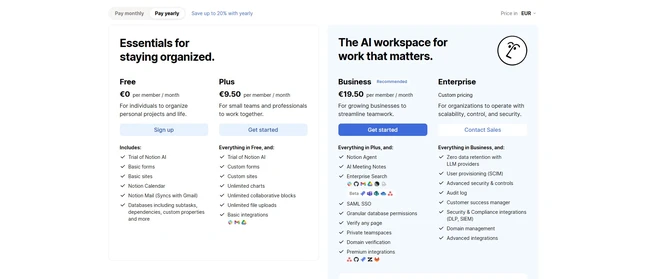
| Plan | Notion AI Access | Monthly Cost (per member, billed annually) | Best Fit |
|---|---|---|---|
| Free | Limited trial only | $0 | Individuals testing the tool |
| Plus | Limited trial only | $10 | Small teams needing docs, not AI |
| Business | Full AI (Agent, Meeting Notes, Enterprise Search beta) | $20 | Teams ready for full rollout |
| Enterprise | Everything in Business plus zero data retention | Custom | Regulated or large organizations |
Business and Enterprise members get 1,500 Standard credits per month for Auto-routed tasks and 500 Select credits for manually choosing a model. Neither balance rolls over.
Auto stretches credits further than picking a specific top-tier model manually. Polishing an email costs around 5 credits on Auto versus 50 on a model like Opus 5.5; tracking task progress runs about 10 credits versus 85. Custom Agents and Workers draw from a separate pool priced at $10 per 1,000 Notion credits per month.
ChatGPT and Notion AI layer intelligence on top of your existing setup. ClickUp takes a different position: tasks, docs, chat, and AI live in one workspace from the start. If your team's productivity problem is too many tools talking past each other, that distinction matters.
ClickUp suits project-heavy teams that need AI to connect work, not just comment on it. ClickUp Brain automates task creation, suggests priorities, surfaces blockers, and ties conversations directly to actionable items. A project manager running a sprint can feed meeting notes, Docs, and chats into Brain and get back fully structured tasks with subtasks, owners, and due dates already filled in. Teams buried in comment threads get similar relief: Brain summarizes updates, comments, or project timelines in one click instead of making someone scroll through three weeks of back-and-forth. Operations and reporting teams can pair Automations with Dashboards to track every rule change, task move, and automation run without touching a spreadsheet.
For operations leads tired of exporting data to build a status report, this is where ClickUp earns its spot.
ClickUp Brain² goes beyond answering questions. It completes entire workflows end to end, builds decks, dashboards, and other Artifacts, keeps persistent memory of your preferences, and runs complex multi-step sequences from a single prompt. Max is Brain's default model, but you can switch to ChatGPT, Claude, or Gemini mid-conversation without losing workspace context.
Super Agents extend this further. They carry full context of your workspace, run multi-step workflows around the clock, route approval requests based on project type or budget thresholds, and reassign tasks dynamically based on workload. AI Skills work alongside Super Agents as saved instructions, so Brain handles repeat requests consistently without needing a fresh prompt each time.
On the automation side, AI Fields let ClickUp fill in trigger conditions for you. The platform also recommends automation rules based on repeated task patterns and flags where existing automations break down over time.
Every plan includes 50+ native integrations: Jira, Microsoft Teams, Figma, Zapier, Make, and Google Calendar ship on Free Forever. Paid plans add Google Drive, Dropbox, Box, and OneDrive. Business plans unlock Confluence, and Enterprise plans add Salesforce, Tableau, and Azure DevOps.
Integration Automations handle the cross-app logic: send an email when a task is unblocked, update a status when a GitHub pull request merges, create a task from a new Google Calendar event, or post a Slack message when a due date changes. For custom connections, ClickUp's public API, webhooks, and MCP Server let an AI assistant connect directly to ClickUp data and trigger workflows from ClickUp events. Through Zapier, ClickUp also reaches 1,000+ additional apps, including Zendesk and HubSpot, that don't have a dedicated native integration.
Not every connection runs both ways yet. The Microsoft Teams integration doesn't support automated due date alerts to a Teams channel directly, so teams that need that flow must route through Zapier or use ClickUp's own Teams Hub notifications.
AI access also varies by role. Free Forever guests and view-only guests can't create Super Agents or Autopilot Agents, though they can trigger agents already set up in locations they can access. Members, admins, and owners get full creation and management rights by default.
On security, every plan includes 2FA through an authentication app. SMS-based 2FA, Google and Microsoft SSO, Okta, SAML SSO, and SCIM Provisioning are reserved for Business and Enterprise tiers. Enterprise plans add audit trails, session management, and HIPAA support availability.
ClickUp runs five plans: Free Forever, Core, Business, Enterprise, and Max. Every plan includes ClickUp Brain² and a monthly AI credit allowance.
| Plan | AI Credits (per user/mo, pooled) | MCP Calls per Day | Automation Actions per Month |
|---|---|---|---|
| Free Forever | 500/workspace | 100 | 100/workspace |
| Core | 1,000 | 300 | 1,000/workspace |
| Business | 1,500 | 1,000 | 10,000/workspace |
| Enterprise | 3,000 | 25,000 | 1M/workspace |
| Max | 10,000 | No daily cap | 1M/workspace |
When a team burns through its credits, AI Super Credits offer a pooled monthly top-up for Super Agents, AI Fields, and image generation. ClickUp estimates a 500-person company saves $307,980 a year compared to paying separately for non-enterprise versions of comparable tools. Its Super Fair Billing policy passes on savings when AI costs drop and absorbs sudden price spikes from providers.
The other three tools on this list help your team produce work. Slack's AI helps your team find it again after it disappears into a channel no one can remember. That's a different problem, and for most teams, it's just as real.
For customer service teams, Slack AI keeps everyone aligned on a thread while agents focus on actually resolving the issue. Engineering teams pull incident solutions from across the organization without leaving the conversation. Sales teams summarize account channels before a call instead of scrolling back through weeks of messages. Marketing teams translate messages instantly so global campaigns don't stall waiting on a human translator.
The time savings are concrete: users save an average of 97 minutes weekly across recaps, thread summaries, and search answers, based on an internal Slack pilot.
Today (currently in early access) works as a morning briefing. It signals what needs your attention based on priorities rather than dumping every unread message on you at once.
Slackbot acts as a personal AI agent. It learns your workspace, prepares you for meetings, analyzes reports, and drafts project briefs. Over time, it adapts its tone to match yours — which is either useful or slightly unsettling, depending on your disposition.
Conversation summaries condense any channel, DM, or thread on demand. You can summarize unread messages, the last seven days, or a custom range on desktop. Recaps deliver a morning digest of what you missed, refreshable throughout the day.
Search answers are worth calling out separately. Ask a plain-language question and Slack returns a direct answer with citations linking back to the source message or file. It pulls from channels, DMs, canvases, huddle notes, uploaded files, and linked documents in Google Drive or SharePoint. No scrolling required.
File summaries auto-generate for shared PDFs, Word docs, PowerPoint files, and spreadsheets. Translation lets you set a default language and convert any message instantly — visible only to you.
Enterprise search pulls structured data from connected platforms. Agentforce agents run directly inside Slack channels, threads, and DMs to query data and trigger actions without leaving the conversation. Out-of-the-box agent apps include Adobe Express, Asana, Box, Cohere, Workday, and Writer, with more in the Marketplace.
Workflow Builder handles recurring steps. The Summarize public channels action, for example, can post a generated summary to a channel or save it to a canvas, depending on your organization's retention settings.
Slack's AI only surfaces what a given member already has permission to see. Search results, summaries, and Slackbot responses never pull from private channels or DMs someone isn't part of. That's a meaningful design choice, not a footnote.
Customer data never trains the underlying large language models (LLMs — the AI models doing the text work). Slack uses Retrieval Augmented Generation (RAG), a method that passes only the data needed for a specific task to the model at the moment of inference, without storing it afterward. A quality monitoring system tracks outputs and flags issues like hallucinations as they appear.
Org owners and admins control which AI features reach which users. They can disable AI across the entire workspace at any time.
AI feature availability varies significantly by plan:
| Feature | Pro | Business+ | Enterprise+ |
|---|---|---|---|
| Conversation summaries, huddle notes | ✓ | ✓ | ✓ |
| Search answers, recaps, file summaries, translations | ✓ | ✓ | |
| Workflow automation, canvas content generation, Slackbot | ✓ | ✓ | |
| Enterprise search | ✓ |
AI features are included across all paid Slack plans. For team size and compliance questions, a Slack account executive can help you work out which tier fits.
Zapier works differently from every other tool on this list. It doesn't add another assistant to your stack — it connects the 9,000+ apps your team already uses, including the AI ones, so workflows run across tools rather than inside just one of them.
For IT and support teams, the payoff is concrete. Mercari US resolves 47,000 tickets entirely through Zapier each month, freeing more than 3,000 support agent hours. Palo Alto Networks automates 13% of support escalations, saving 10 minutes per escalation and roughly $150,000 a year — about one full-time employee.
Marketing, IT, and project management rank as the top three roles using AI automation across Zapier workflows. AI-related task volume on the platform has grown past 760% in two years. That's not a marketing claim; that's a signal about where teams are actually sending their repetitive work.
Fluid Determinism — Zapier's term for its hybrid approach — sits behind every workflow. You describe the steps in plain language, and Zapier decides where AI adds value versus where a fixed rule works better, using AI only when something unexpected happens. That keeps token costs down and outputs predictable.
Four workflow types run on this spectrum, from strictly deterministic steps to a fully agentic workflow that plans, adapts, and loops in a person for review. Zapier MCP (Model Context Protocol, a single governed connection layer) gives every AI agent — Claude, ChatGPT, Gemini, or Cursor — access to over 30,000 actions through one integration. More than 593 million AI tasks have run on Zapier to date.
Zapier connects over 9,000 apps through 66,000+ triggers and actions, and handles auth, retries, and rate limits on its own. You can build workflows visually, in code, or by describing what you need directly to ChatGPT or Cursor.
Next Gen Zaps add loops over thousands of records, branching paths, and a Workflow Manager for step-level visibility. They run free on any paid plan during Early Access, with billing starting December 1, 2026.
AI Guardrails scan every AI step and MCP connection for PII, prompt injection, and toxicity, then block, route, or flag per your policy. Credentials stay encrypted and never enter an agent's context window. Zapier holds SOC 2 Type II and SOC 3 certification, encrypts data in transit and at rest, and lets Enterprise admins stream audit logs to Datadog or Splunk in real time.
The Approvals feature can pause any workflow change until someone signs off — worth enabling on anything that touches customer data or financial records. Zapier's breadth also means setup complexity scales with ambition: simple two-step Zaps take minutes, but multi-branch agentic workflows require a solid grasp of your data flow before you automate it.
Every plan prices by task — one task per app action, the same rate on a classic Zap or a Next Gen Zap. Enterprise accounts add SSO, SCIM provisioning, and automatic AI model opt-out, while 2FA ships on every plan. Pricing details aren't listed publicly for Enterprise; contact Zapier directly for a quote.
Each tool earned its spot by solving a specific problem. Use this table to match your team's biggest bottleneck to the right starting point.
| Tool | Best For | Key AI Features | Integrations | Security | Pricing Model | Main Limitation |
|---|---|---|---|---|---|---|
| ChatGPT | General drafting and synthesis across teams | Shared projects with private memory, connectors (Gmail, Calendar, GitHub), custom GPTs, automatic connector activation | Slack, SharePoint, Airtable, Google Drive, Jira, Figma, Clay, and more via plugins | ISO/IEC 27001, 27017, 27018, 27701; SOC 2; IP allowlisting; role-based access | Free; Plus ($20/mo); Teams/Business; Enterprise/Edu (custom) | Training cutoff limits recent event awareness; cannot automate high-stakes decisions without human review |
| Notion AI | Finding and using knowledge that already exists in your workspace | AI chatbot + writing assistant + search (GPT-4 and Claude); one-click skills; reads PDFs and images; AI Meeting Notes | 185+ apps including Slack, Google Drive, GitHub, Jira, Microsoft Teams, Figma, HubSpot, Asana | SOC 2 Type 2, ISO 27001; zero data retention on Enterprise; 30-day or less on other plans | Free ($0); Plus ($10/member/mo); Business ($20/member/mo); Enterprise (custom) | Not suited for complex calculations or multi-app aggregation; misconfigured sharing can expose entire databases |
| ClickUp | Running tasks, docs, and AI inside one workspace | Brain² with Max model (switchable to ChatGPT, Claude, Gemini); Super Agents; AI Skills; AI Fields; automation recommendations | 50+ native (Jira, Teams, Figma, Zapier, Google Calendar); 1,000+ via Zapier; public API, webhooks, MCP Server | 2FA on all plans; SSO, SAML, SCIM on Business+; audit trails and HIPAA support on Enterprise | Free Forever (500 credits/workspace) through Max (10,000 credits/user); five plans total | Teams integration does not support automated due date alerts to channels; guest roles cannot create Super Agents |
| Slack | Surfacing buried context from conversations your team already had | Today briefing; Slackbot personal agent; conversation summaries; search answers with citations; file summaries; translation | Enterprise search from connected platforms; Agentforce agents; Workflow Builder; Adobe Express, Asana, Box, Workday, Writer | RAG-based retrieval; no customer data used for training; permission-scoped access; org-level admin controls | Pro (basic AI); Business+ (full AI); Enterprise+ (adds enterprise search) | Today feature is still in early access; feature availability varies sharply by plan |
| Zapier | Connecting AI to the rest of your app stack without adding another assistant | Fluid Determinism; four workflow types (deterministic to agentic); Zapier MCP; Next Gen Zaps with loops and branching | 9,000+ apps; 66,000+ triggers and actions; works with ChatGPT, Claude, Gemini, Cursor | SOC 2 Type II, SOC 3; encryption in transit and at rest; AI Guardrails for PII, prompt injection, and toxicity; audit logs to Datadog or Splunk | Task-based pricing (one task per app action); same rate for classic and Next Gen Zaps; Enterprise adds SSO, SCIM, AI opt-out | Next Gen Zaps billing starts December 1, 2026; requires a clear grasp of workflow logic to get full value |
Each tool here covers a different gap. ChatGPT handles drafting and synthesis across text-heavy work. Notion AI is the pick when scattered knowledge is the bottleneck. ClickUp suits teams that want tasks, docs, and AI in one place. Slack is the right call when buried context and communication overload are the actual problem. Zapier works best when the real issue is disconnected apps doing nothing useful on their own.
Start with your team's biggest time drain, not the longest feature list. Pick one tool, run it for 30 days, and measure what changed. The best AI productivity platform is the one your team opens every morning without being asked.
Founder and editor of AITL. Researches, tests and curates the AI tools listed in the directory.