-01.svg)



Development
The Architecture of Agency: Navigating the Claude 4.6 Ecosystem
Apr 18, 2026

8 min read
The idea behind Notion AI has expanded significantly. What started as an AI enhancement for writing and summarization is now becoming something much broader: an AI-native workspace designed to reduce fragmentation across tools, docs, databases, meetings, and communication.
In 2026, Notion AI is positioning itself as more than a productivity feature. It is becoming a system that combines knowledge retrieval, structured work, connected apps, and agent-driven execution inside a single environment.
Notion AI is the intelligence layer inside Notion’s workspace ecosystem. It sits on top of pages, databases, tasks, and connected tools, helping users not only generate content but also search, synthesize, organize, and act on information.
This matters because the modern workplace is still highly fragmented. Teams often split knowledge across Slack, Google Drive, GitHub, Jira, docs, meetings, and calendars. Notion AI’s strategic role is to unify more of that environment into one searchable, actionable system.
Rather than behaving like a standalone chatbot, Notion AI uses workspace context to produce responses and actions that are grounded in the tools and information teams already use.
Notion AI is especially strong for teams that want to centralize work and reduce operational friction.
It is a good fit for:
It is particularly useful when information is spread across different systems and people need one place to retrieve, summarize, and act on that knowledge.
Notion AI has grown into a broader platform with several important capability layers.
A major shift is the introduction of AI agents inside the workspace. These agents are designed to do more than answer questions. They can work through multi-step tasks, navigate workspace context, and help with structured execution.
The broader idea is simple: instead of only helping people write faster, Notion AI aims to help teams move work forward.
Custom Agents extend this model into repeatable operational workflows. These can be used for recurring tasks such as:
This is important because it pushes Notion AI from ad-hoc assistance toward persistent automation.
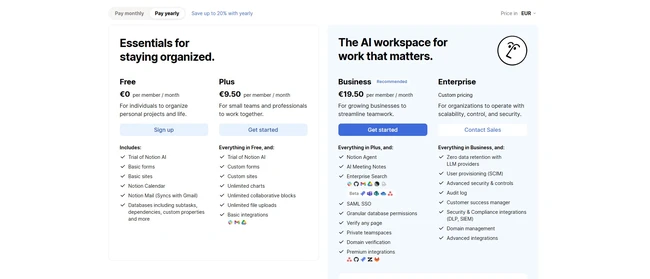
One of the strongest parts of the platform is Enterprise Search. Through connectors, Notion AI can work across:
This allows teams to retrieve information semantically rather than relying only on keyword search. In practice, this means users can search for decisions, documents, conversations, project status, or technical context even when that information lives outside Notion itself.
Notion AI also expanded into meeting memory. It can capture notes, summarize discussions, identify decisions, and support follow-up workflows. With integrated mail actions and calendar support, it moves closer to an executive-assistant layer inside the workspace.
Notion has always been strong on databases. AI Autofill and structured database support add another layer by helping categorize, summarize, and organize information automatically. This is especially useful for feedback systems, project tracking, and internal knowledge operations.
Notion AI stands out because it is not just trying to be an assistant inside a document editor. Its bigger ambition is to become an operating layer for work.
Several things differentiate it:
That combination makes it more than a content tool. It is closer to a unified work environment with AI built into the system.
Notion AI has several clear strengths:
It also benefits from being part of an already familiar product. Teams that already rely on Notion do not need to adopt an entirely separate AI environment to start getting value.
It is not perfect, and the research points to some practical constraints:
In other words, Notion AI is powerful, but some of its most compelling capabilities make the most sense for teams with established workflows and growing operational complexity.
Notion AI makes the most sense for:
It is less compelling for users who only need a simple standalone chatbot or who do not rely on Notion as a core work system.
Notion AI is becoming much more than an AI writing add-on. It is evolving into a broader workspace intelligence layer that combines search, documentation, structured work, connected apps, and agents.
That shift matters.
The real value of Notion AI is not just in generating text faster. It is in helping organizations turn fragmented information into usable context and coordinated action. For teams already building around Notion, this makes the platform far more strategic than a typical productivity tool.
As AI tools continue moving from assistance to execution, Notion AI is one of the clearest examples of what an AI-native workspace may actually look like.